Steal SEARHC’s playbook


How they did it
With a more user-centric training strategy (👋🏼, Real-Time Enablement) and a more creator-friendly Digital Adoption Platform (👋🏼, Tango’s Software Knowledge Layer), Ken’s team of four had what they needed to lead 1,400 employees through massive organizational change with minimal resistance.
Check out what they were able to accomplish, what it meant for their business, and what they learned while rolling out Workday below.
To prepare for onboarding and implementation, SEARHC’s ERP team needed to create hundreds of Workday standard operating procedures. As quickly as humanly possible. Without a bunch of additional headcount. And while they were all still new to Workday themselves.
Since they wouldn’t have indefinite access to Workday’s consulting team, Ken originally encouraged his team to capture technical processes with Tango (instead of scrambling to take notes and screenshots).
“Someone can be talking through a process
and we can just be clicking along on the side.”
Click-to-Create proved to be such an easy way to create Workday documentation that they decided to use Tango for end user training. By letting Tango AI do the heavy lifting—of formatting screenshots, writing step-by-step descriptions, and assembling the guides—Ken and his team were able to build a library of answers to Workday FAQs before launch.
How specific and concise each walkthrough was.
“We agreed we didn’t want a Tango on how to do accounting in Workday for a week. We wanted a Tango on how to post a journal. A Tango on how to reverse a journal. You get the idea. Nobody has patience for doing a 20-minute process, especially when 30% isn’t relevant to them.”
2. How much less tedious and time-consuming documentation was overall.
This was especially true for Stephanie, SEARHC’s top Tango creator and Ken’s right hand for the Workday rollout.
“Before Tango, I had to take a screenshot, add it to a Word document, wrestle with the formatting, write up text to go with it, and then go to the next step. With Tango, I can create a process as I’m doing it—which means I don’t have to duplicate my efforts at any stage.”
Looking for more software documentation wisdom from SEARHC? Beyond tackling *one* task per process, Ken and Stephanie suggest:
- Keeping all walkthroughs to 15 steps or fewer
- Including a screenshot for every step
- Using a tool that makes SOP creation easy for experts at large (in the end, 50+ SEARHC employees contributed to the Workday rollout 🏆)
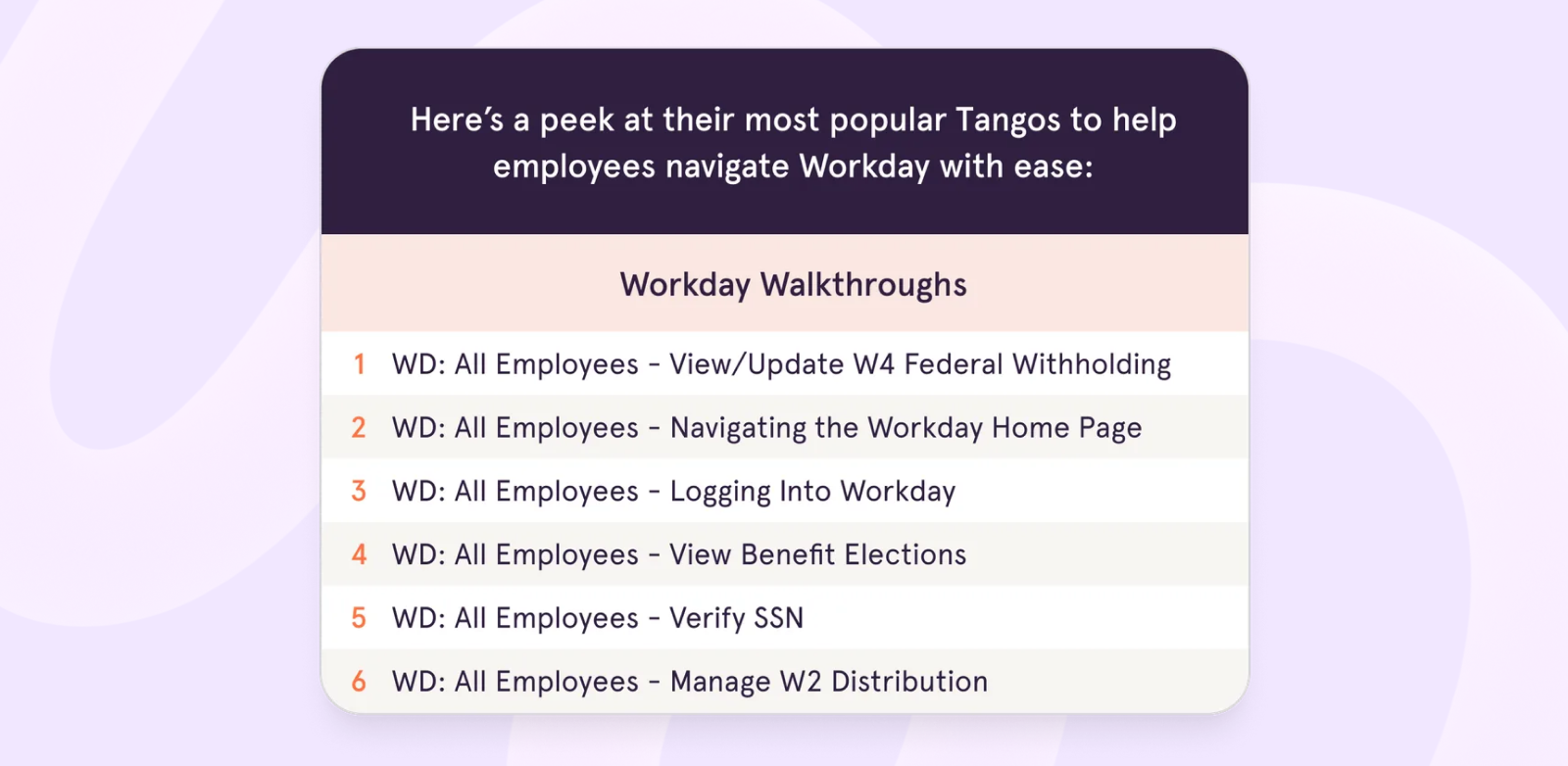
- Introducing a simple and consistent naming convention
SEARHC has had good luck with this one: [Software Name]: [End User Audience]: [Task Name].
SEARHC's frustrations
Ken, Stephanie, and the rest of the ERP team needed to acknowledge two big frustrations at SEARHC.
Problem #1:
Software training looked different in every system.
- In their Knowledge Base (Freshdesk) → Employees would find wikis and PDFs
- In their Learning Management System (Workday Learning) → Employees would find videos and slides
- In their chat and ticketing systems → Employees would find unstructured text
Problem #2:
Software knowledge felt siloed between those [disconnected] systems.
Ken’s takeaway? SEARHC wasn’t doing a great job of making it easy for software users to get unstuck on their own.
“We needed something to tie everything together and give end users looking for answers the exact same experience.”
While traditional Digital Adoption Platforms don’t play nicely with existing learning tools, Ken knew he could use Tango’s two-way integration to A) create a unified learning experience everywhere end users look for help, and B) add more value to their Knowledge Base and Learning Management System.
In practice, that meant:
Software knowledge felt siloed between those [disconnected] systems.
- Linking and embedding Tangos in Freshdesk and Workday Learning
Which enhanced their Knowledge Base and Learning Management content with standardized, bite-sized Workday training
- Adding links back to Freshdesk and Workday Learning in Tangos
Which brought reference and procedural knowledge together in one place
“Say we create a Tango on how to calculate mileage. The first step will include a link to our mileage policy. So anything our end users may have otherwise needed to go find in our fingertips, right when they need it.”
Ken anticipates Tango will be equally useful for accelerating new hire onboarding, long after Workday has been launched.
“The big advantage is that Tangos aren’t videos. Employees can complete tasks while learning them.”
Learning preferences
Research shows most employees prefer to learn a new process by having someone walk them through it step-by step instead of watching a video or reading a document. But that kind of hand-holding also comes with delays and dependencies on busy process experts—and isn’t sustainable or scalable.
To avoid an onslaught of internal Workday support tickets (and slow response and resolution times for end users), Ken and Stephanie needed to make self-service a no-brainer. While new Tango users can’t get over how fast they can create software training with Click-to-Create, power users know that’s only the (first) half of it.
“Guidance is like having a subject matter expert sitting right next to you, showing you what to do. It’s so self-service it’s ridiculous.”
With Tango Guidance, the ERP team wasn’t only able to create an entirely new end user learning experience.
In practice, that meant:
Software knowledge felt siloed between those [disconnected] systems.
- Show SEARHC’s employees exactly what to do and where to click in Workday
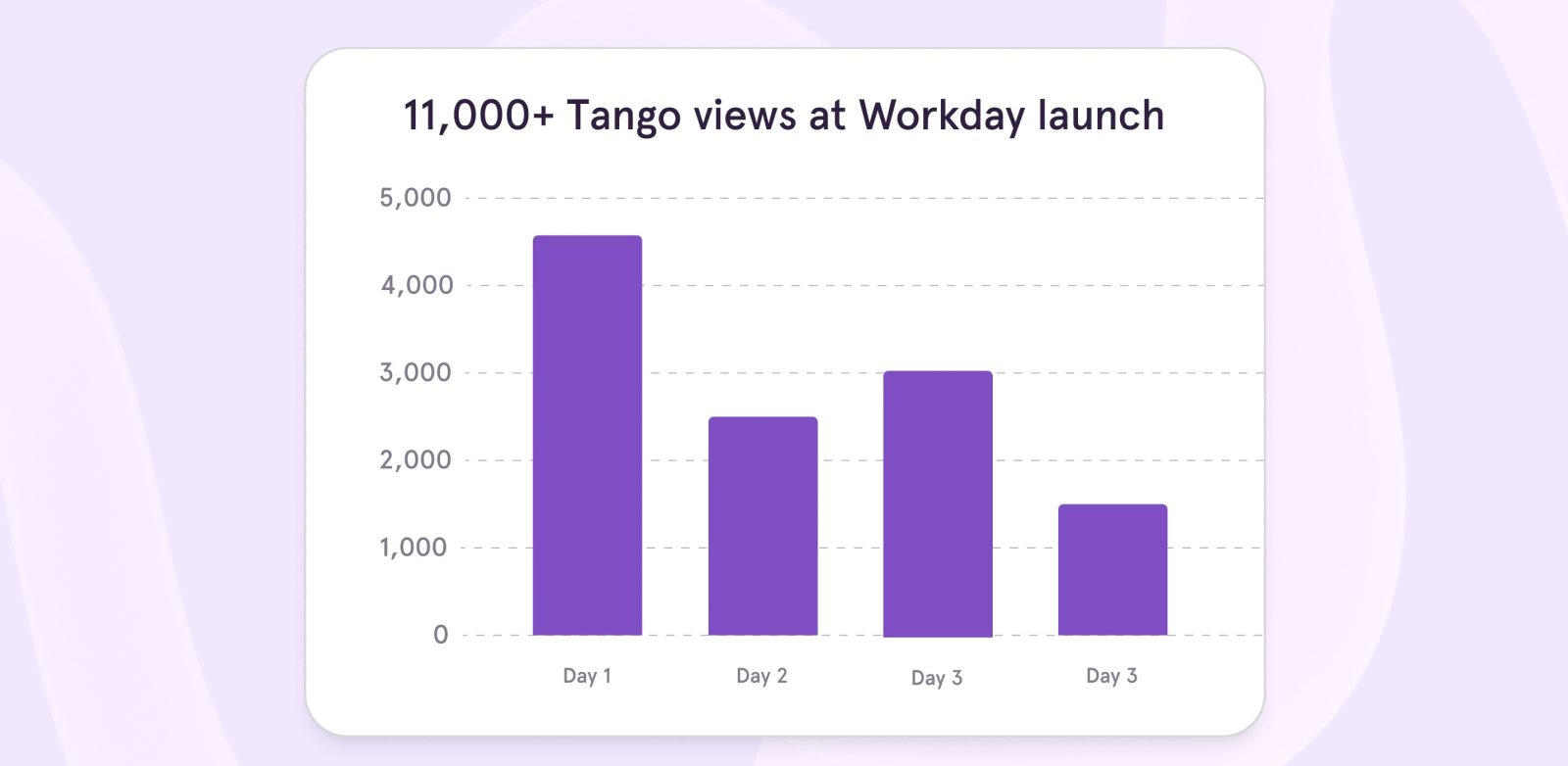
While helping them collectively execute over 4,000 core processes in the first week
- Give Workday users 24/7, on-demand support with Tangos covering all the essential processes
While deflecting 90% of their expected support ticket volume through self-service
- Decrease response times by quickly responding to any tickets with Tango Direct-to-Guidance links
While effectively reducing the time between needing help and getting help
According to Stephanie, Guidance removes the confusion that used to lead to a lot of back and forth.
“80 to 85% of the tickets that I see can be solved with one interaction (and one Tango). Guidance takes away the communication barrier. People don’t need to think very hard or even read the steps—they just need to follow them.
”From Ken’s perspective, people have been warming up to Tango even faster than Workday.
“Employees say Workday is kinda tricky but the Tangos are awesome. I’ve done nine big enterprise-level rollouts in my career, and they’ve all been way more painful than this. I haven’t had more than 20-30 tickets a day, which is pretty outstanding given the number of people Workday touches.”
Eliminating training cost
Enterprises like SEARHC often hire full-time training managers or contract resources from training companies to provide individualized training to all of their department heads, managers, and employees.
The cost for this type of training can exceed $50-100K in the first year. And even after all of the training sessions, it’s hard to know whether employees are actually completing all of the new processes correctly. 🫠
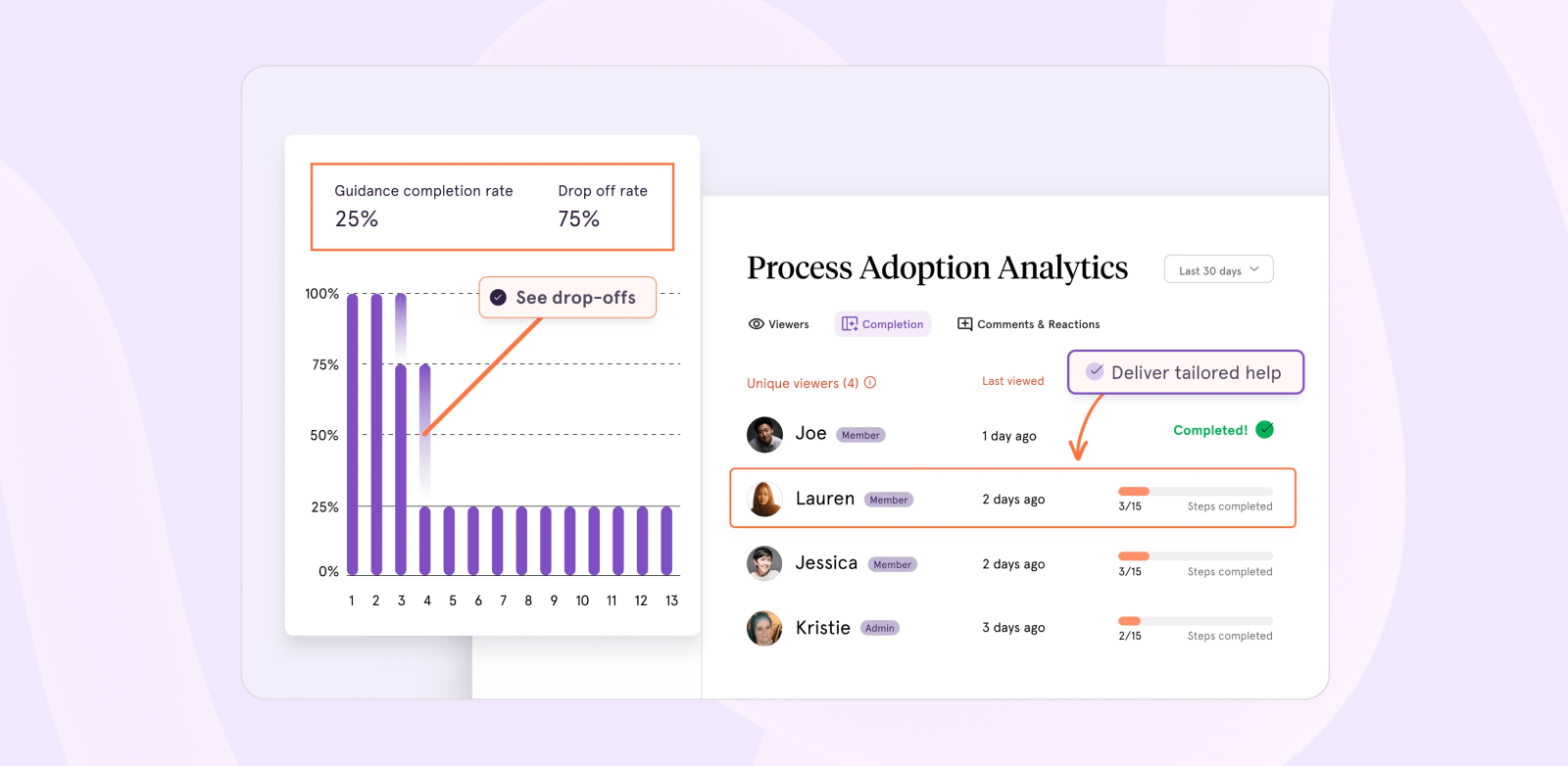
To go beyond departmental surveys and anecdotal feedback to show the impact of their Workday training and enablement, Ken needed a way to deliver a detailed breakdown of adoption—by process, team, and end user.
SEARHC has been able to use
Tango’s analytics dashboard to:
- See which employees are using their walkthroughs and how often
- Drill into any individual steps tripping up end users, so they can improve the process and offer personalized help
- Share specific adoption analytics with stakeholders to show they’re getting full value from Workday
Impact of using Tango for software rollout
“We’re getting a lot of really good feedback about the rollout, and I think that’s 100% because of Tango. If you’re introducing new software, you need Guidance. It’ll help you train your teammates without making you the one who actually has to train (and re-train) them.”
With Guidance, enablement doesn’t have to end when formal onboarding phases do.
Even with the rollout in the rearview mirror, Workday Tangos continue to see 400+ weekly views a month. Ken has already been able to go to his CEO, CFO, CHRO, and CIO and share that Tango has shown ROI by:
- Reducing training time and costs
- Introducing ongoing Real-Time Enablement (beyond initial training)
- Increasing overall Workday process adoption
FAQ
In ISO 9001, procedures (like SOPs) cover how teams should carry out a process while work instructions describe the steps to carry out tasks within a procedure.
A process in ISO 9001 is a much broader overview of the process's goals, what teams need to get done, and other high-level information. The level of detail increases when going from processes ➡️ procedure ➡️ work instructions.
OCPs are processes in place to manage risks, while SOPs can be broader and refer to any routine processes on your team’s plate.


Next time someone asks, “how do I…?” Send a Tango.
Start capturing your first workflow today.

