Case Study
How SEARHC
Rolled Out Workday To 1,400 Employees
with Tango Enterprise

Summary
SEARHC is a non-profit health consortium dedicated to delivering top-tier healthcare to all Southeast Alaskans, no matter how remote.
With a company-wide Workday rollout on the horizon, SEARHC’s enterprise resource planning team needed an efficient way to train themselves and 1,400 others—while minimizing the burden of change and avoiding an avalanche of support tickets.
That’s where Tango came in.



Proof
500
Tango walkthroughs created on Workday pre-rollout
4,527
Total Tango views on Onboarding Day 1
468
End users who self-served in Week 1
400+
Tango weekly views a month post-rollout
90%
Reduction in anticipated support tickets
~$80K
Estimated training costs saved


Overview
A new challenge for an ERP pro
When SEARHC decided to switch from Lawson to Workday, they needed the right person to lead the transition.
Ken Gerry was a natural fit:
- Had 25 years of experience with ERP systems
- Lived in Alaska, where SEARHC is based
- Already knew SEARHC inside and out
Ken stepped into the ERP Director role to help make the transition to Workday seamless.
About SEARHC
1,400 distributed employees across clinical and administrative teams.
Workday rollout across the entire organization.
CEO, CFO, CHRO & CIO involved as key stakeholders.
2 years with Tango across the organization.
Tango Guidance as the biggest unlock.
What was at stake?
The Workday switch would impact all 1,400 SEARHC employees overnight.
Employees needed to learn fast without compromising patient care.
Ken's team needed the rollout to go smoothly, without a flood of support requests.
Traditional software training methods that wouldn’t fly (and why)
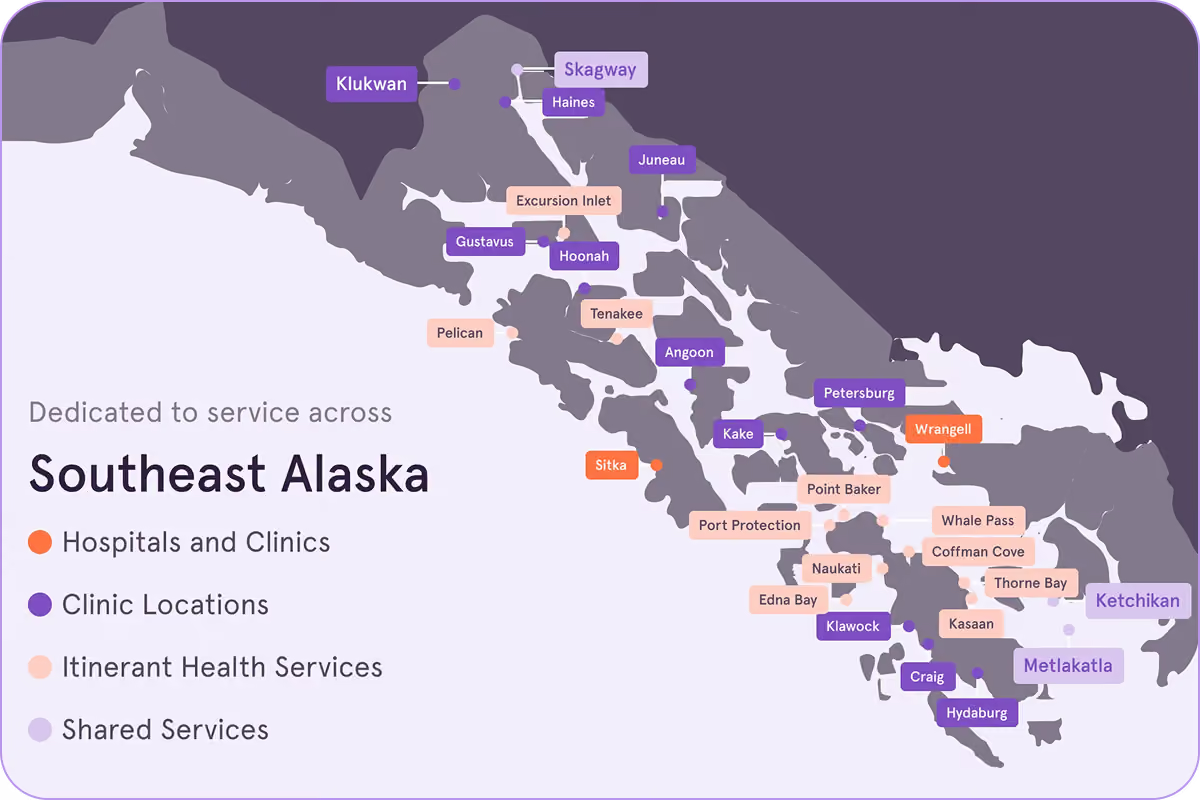
SEARHC had been relying primarily on in-person training for years. But Ken knew from the word “go” that while they could stick with the status quo, it’d be far from optimal. Even if SEARHC didn’t have 27 locations (only two of which don’t require a boat or a seaplane to access 😅), in his experience in-person training:
- Pulls people away from their jobs
- Overloads users with information
- Relies on memorizing processes
- Difficult to schedule and reschedule
In-person training
SEARHC had been relying primarily on in-person training for years. But Ken knew from the word “go” that while they could stick with the status quo, it’d be far from optimal. Even if SEARHC didn’t have 27 locations (only two of which don’t require a boat or a seaplane to access 😅), in his experience in-person training:
- Pulls people away from their jobs
- Overloads users with information
- Relies on memorizing processes
- Difficult to schedule and reschedule
Creating Workday training videos might sound like a decent idea. After all, there would be less traveling and typing involved for training managers, and end users could learn on their own time. But what has Ken learned over the years? Software training monologues are just as exciting to watch as they sound. And long video recordings:
- Are often full of extra fluff that slows people down
- Make it hard to skip straight to what’s useful
- Hard to keep up to date
- Encourage employees to bypass self-service
Long video recordings
Creating Workday training videos might sound like a decent idea. After all, there would be less traveling and typing involved for training managers, and end users could learn on their own time. But what has Ken learned over the years? Software training monologues are just as exciting to watch as they sound. And long video recordings:
- Are often full of extra fluff that slows people down
- Make it hard to skip straight to what’s useful
- Hard to keep up to date
- Encourage employees to bypass self-service
.avif)
Ken loves step-by-step instructions as much as anyone. But in his experience, traditional software how-to guides:
- Too wordy and complex
- Difficult to standardize
- Hard to distribute
- Makes answers hard to find
Dense how-to guides
Ken loves step-by-step instructions as much as anyone. But in his experience, traditional software how-to guides:
- Too wordy and complex
- Difficult to standardize
- Hard to distribute
- Makes answers hard to find
.avif)

“Tango is so easy to use that we made 500 guides in 90 days.
There’s no way a few of us could have done that on our own.”
The game plan
Ken and his team wanted all the end-user benefits of a traditional DAP - without any of the drawbacks. That meant looking for a more modern DAP designed for experts and end users. Tango’s Software Knowledge Layer met every last requirement—while giving Ken a way to help SEARHC leave traditional software training behind.
Include single sign-on (SSO) and SCIM (system cross-domain identity management)
Offer end users step-by-step on-screen guidance in their tools
Make process adoption insights easy to access and action
Require jQuery, CSS, or HTML to create software walkthroughs
Result in another complicated rollout
Result in another complicated rollout

To succeed, the ERP team would need to:
1
Create hundreds of Workday standard operating procedures (SOPs)
2
Meet end users where they are (and where they work)
3
Reduce support tickets with self-service
4
Show Tango pays for itself and drives Workday ROI
Spoiler: They did that and then some. 🥳
Steal SEARHC’s playbook
Client story
Steal SEARHC’s playbook


What’s next
Confetti all around
If you ask Ken and Stephanie’s co-workers, soon there will be a Tango for that, that, and that. 🎉
Multiple departments at SEARHC are already starting to use Tango across 20 other applications (in addition to Workday) to:
About SEARHC
Streamline existing SOPs and codify new processes.
Increase knowledge sharingand improve process adoption.
Minimize the change burden for end users and enable self-service at scale.
Accelerate new hire onboarding and get the most of out of their software.