Process Documentation Part 2: Steal a People Ops Pro’s Framework and Templates

If you’re here from part one of our recap of the process documentation strategy workshop with Jordyn Rarick, you’re in the right place. If not, we’re still glad you’re here—but be sure to check it out. 😉
Now that we’ve covered the what and why of a strong process documentation strategy, let’s get into the how.
A three-pronged approach to building a process documentation strategy
There’s clearly a host of reasons to double down on process documentation. And yet…recent Tango research suggests 71% of organizations have less than half of their processes documented.
At first—due to sheer volume—capturing even the most basic processes may feel overwhelming. To start strategically vs. somewhere, Jordyn recommends:
- Identifying which processes are directly linked to business outcomes (and starting with those!)
- Breaking your process documentation strategy down into three phases
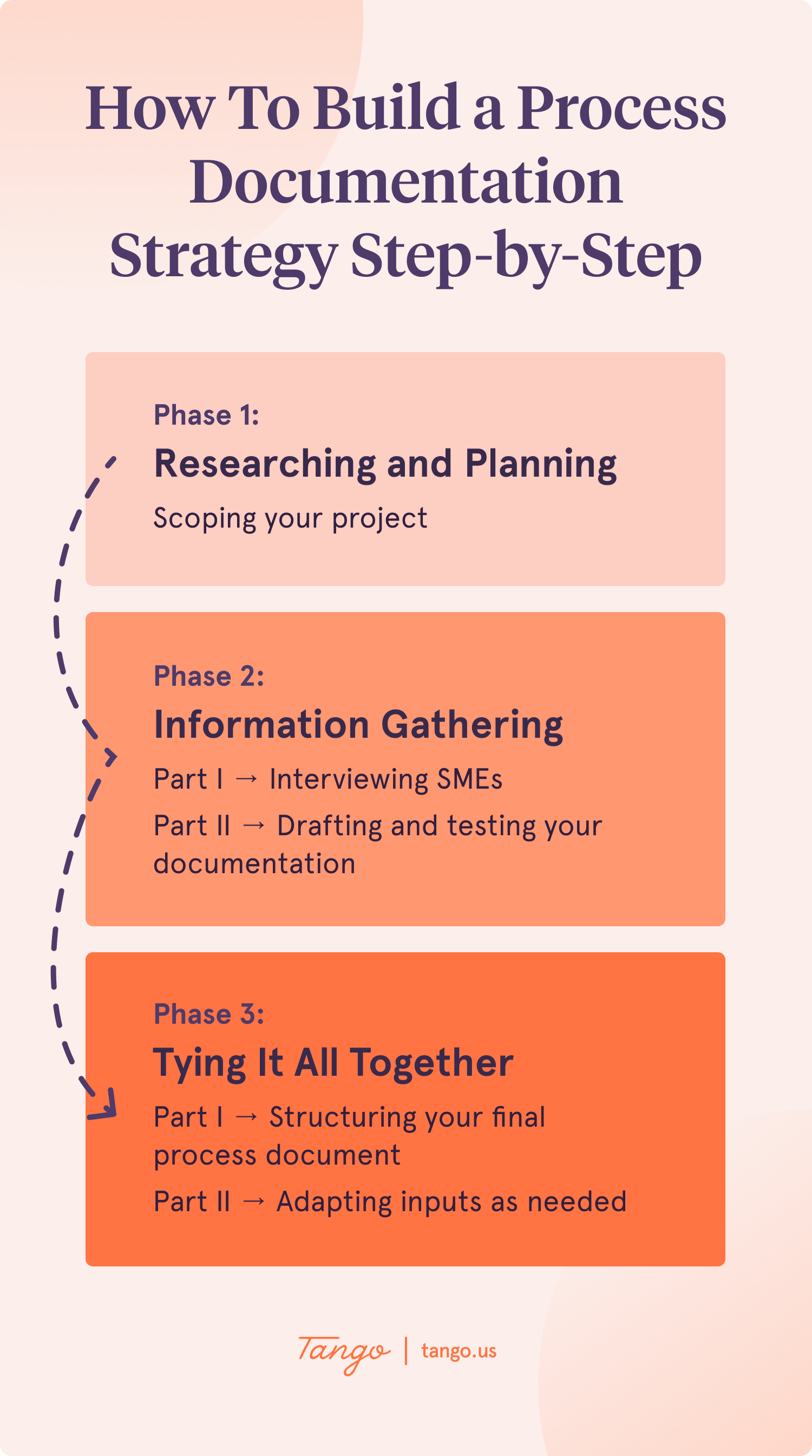
Here’s a customizable project tracker template to help you get organized as you move through each phase.
- In the Phase 1 section, you can fill in tasks involved with scoping your specific process document, like identifying your primary points of contact and rounding up all existing documentation and resources.
- In the Phase 2 section, you might add some tasks to help you schedule SME interviews and a few feedback sessions on early iterations of your documentation.
- In the Phase 3 section, you can keep track of all the moving parts associated with finalizing your process document and getting it out into the wild.
Here’s an example of a project tracker for a smaller process and a larger process.
Let’s dig into each phase in more detail. 👇🏼
Phase 1: Researching and planning
Take it from Jordyn: If you knock Phase 1 out of the park, Phases 2 and 3 will be ~100% more likely to be successful.
One of the biggest skills in HR operations is the ability to zoom in and out. In this case, you need to get as close as you can to the details in order to step back, develop, and ship a fully documented process.
Bonus: Learning as much as you can about the purpose of the process, who’s involved, what resources are available, etc. will increase your credibility with SMEs and stakeholders right off the bat. 💪🏿
Phase 2: Information gathering
Creating specialized documentation to enable people to execute complex tasks is challenging—especially when you aren’t an expert yourself.
“It takes a village” is probably about right—and explains why Jordyn recommends building in a buffer to this phase. Of the three, it usually takes the longest.
Part I: Interviewing SMEs
Chances are high that you’ll need to work with an SME to draft your process documentation.
If you're working with an SME for the first time, there’s also a good chance that they won’t have had much practice breaking down steps they know by heart into instructions that anyone can follow. Without having to tap them on the shoulder or ping them for additional context.
"Capture as much as you can from during your SME interviews—and then eliminate anything that your end users don't need to know.
It's much easier to trim a more comprehensive process document than it is to suss out which steps might be missing."
-Jordyn Rarick, People Operations Coordinator at Marqeta
Other tips for conducting successful SME interviews?
- Approach your SME as a highly collaborative partner
- Lean into your expert’s preferred working style
- Minimize the number of SMEs you consult
- Give them a plug-and-play process outline to get the ball rolling
- Remind them to act as if no one has the technical knowledge they do
- Remember that the outcome of the process is just as important as the process itself
"The ideal scenario is your SME hands this template back to you, and you immediately uncover the 'why' behind a specific process—in addition to the what, where, when, and how."
-Jordyn Rarick, People Operations Coordinator at Marqeta
Want to make a copy of Jordyn’s SME process outline in five seconds flat? There’s a Tango for that:
Part II: Drafting and testing your documentation
Fast forward to a much more refined version of the initial process outline your SME hopefully handed back to you.
Are there any steps you can simplify? Omit altogether? Clarify? Run through the process yourself and see if you’re successful. To vet your documentation even further, ask a few (equally non-expert) friends to do the same.
One word to the wise? Don’t forget about all the reasons why people typically don’t like documentation.
Now would be a great time to see where you can replace any walls of text with a Tango. 😁
In case you’re new to Tango: you can eliminate much of the pain you may have previously associated with creating process documentation with the “capture” tool.
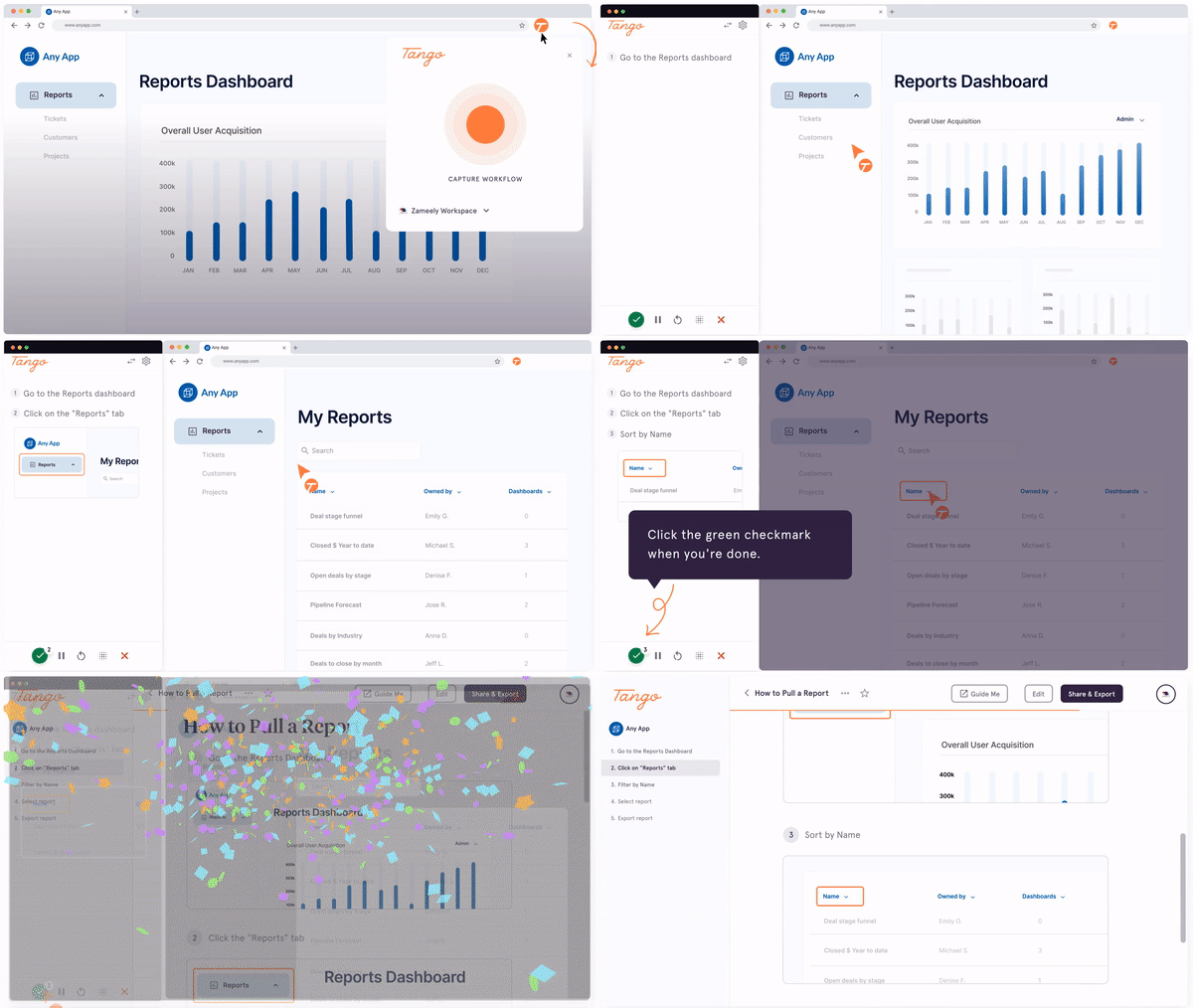
With Guide Me, you can tackle the other half of the equation: making process documentation easier for your users to find, trust, follow, apply, appreciate, etc.
When your end users click on the “Guide Me” button for help completing a real-world task, you’ll be able to:
- See who’s using your how-tos, how often, and where they’re getting stuck
- Pinpoint usage and improvement opportunities
- Take the guesswork out of your guides and see what’s working and what’s not
- Improve your process documentation over time
Phase 3: Tying it all together
You’ve done your homework, interviewed the experts, and created and tested your template several times. What’s left, at this point? Two things.
Part I: Structuring your final process document
You want to think about presentation and effectiveness even more carefully now. Ideally, your final format will be on-brand and easy to:
- Share
- Access
- Follow
- Edit/improve
Another good box to check? Whether your end users will experience your process document as a one-stop shop. Here’s an example in Google Docs, from Jordyn and her team.
Note: If you’re using Tango to create your documentation (💘), you can embed your how-to guides directly into popular tools like Coda, Confluence, Notion, Guru, SharePoint, and Zendesk. Any updates you make to your original documentation will be reflected everywhere else—so no more version control issues. Teach it once, and let Tango do the repeating. 🙏🏼
Part II: Adapting the inputs as needed
It goes without saying that processes change all the time.
The more diligent you are about revisiting and auditing your process documentation, the more effective (read: valuable) it will be.
Jordyn recommends setting up a regular cadence to ensure your process documentation remains current, and when possible—updating any outdated instructions as soon as they go out of date. It’s a lot easier to swap in a new screenshot and tweak one step than it is to rebuild a complete process document from scratch!
Impact (individually and at large)
At some point (ideally early in your career!), making an impact at work goes beyond your individual achievements.
Doing meaningful work becomes less about what you’re able to put your name on (the most highly adopted process document in company history 🔥) and more about the shifts you’re able to help your organization make over time.
Which is more valuable: delivering one stellar process document, or building a process documentation strategy others can emulate, driving a 98% success rate on critical business processes, and surveying your end users to find they’re 3x happier after six months? #BeLikeJordyn
P.S. Looking for more intel about process documentation? Check out our must-have guide for 2026—with even more templates. 🕺🏽



Next time someone asks, “how do I…?” Send a Tango.
Start capturing your first workflow today.